


Feature Highlight: JEDI's Built In Edge Data Logger for Open, pandas-Ready CSV Data
An edge data logger records sensor readings and device metrics on the machine that collects them, so your time-series history stays next to the process it describes. Machinechat JEDI includes one out of the box. Any reading that reaches a JEDI data collector, whether over MQTT, HTTP, Modbus, serial, or LoRaWAN, can be written to local disk without setting up an external database or time-series infrastructure.
Since JEDI 4.0, that data is stored as plain, hourly CSV files in a predictable folder structure, a format chosen for compatibility with AI, machine learning, and data science workflows. You can open the files in any editor, load them into pandas, or pass them to the analytics tools your team already uses.
Why JEDI's Integrated Edge Data Logger?
A self-assembled IoT stack often combines a message broker, a time-series database, a flow tool, and dashboard software, such as the MING stack (MQTT, InfluxDB, Node-RED, Grafana). Each component has to be installed, secured, and kept compatible with the others.
But with JEDI, data collection, storage, visualization, and alerting run in one application.
Capture and Store Data Where It's Generated: JEDI persists sensor data on the edge device, gateway, or the PC that collects it. So historical records stay on the hardware you control and are available for trend analysis and root-cause investigation.
One Pipeline from Data Collector to Disk: Every JEDI data collector, from the MQTT broker and Modbus to LabJack, ChirpStack LoRaWAN, and the Node-RED bridge, feeds the same logger, with no separate ingestion service in between.
Log Only the Data That Matters: Enable historical logging per metric and set a retention period in days for each one, keeping disk usage predictable.
Local Persistence During Network Outages: Because data is written to local storage, logging doesn't depend on WAN or internet connectivity, and a dropped uplink doesn't create gaps in your local record.
No Separate Broker, Database, or Dashboard Server to Maintain: JEDI's MQTT broker, data logger, and dashboards ship in the same application, with fewer services, ports, and credentials to manage.
Open CSV Storage Built for Data Science Workflows
Unlike data loggers that use proprietary binary formats, JEDI writes standard CSV that spreadsheets, Python, R, and MATLAB read without special drivers.
Manage Data Storage, Set Data Retention, and Compression
How JEDI Organizes Your Data on Disk
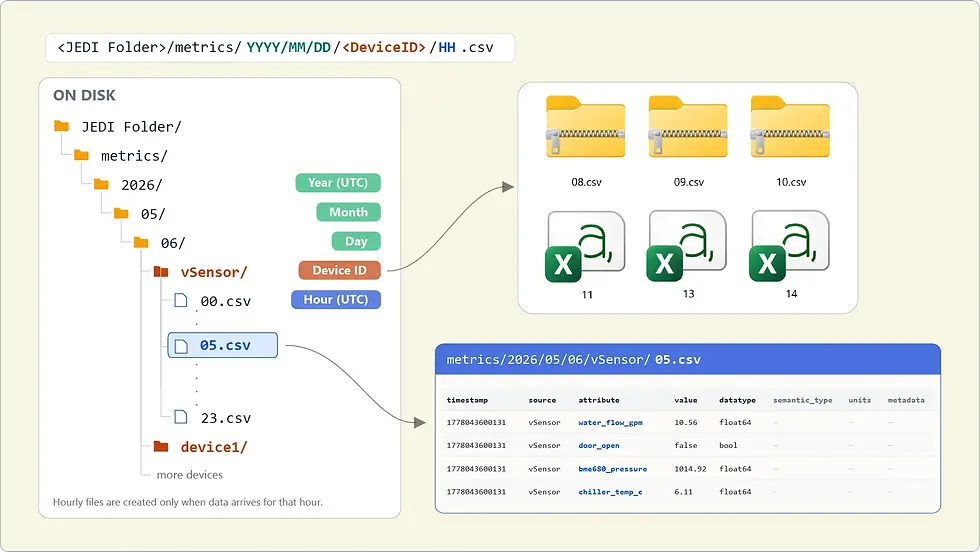
Logged data is written under a metrics folder in the JEDI installation directory, following the path metrics/YYYY/MM/DD/<DeviceID>/HH.csv.
Partitioned by Date, Device, and Hour: Data is partitioned by UTC date, device ID, and hour, with files 00.csv through 23.csv created only when data arrives. This time-based partitioning makes range queries simple: one device on one day is one folder.
A Long-Format Schema That Adapts as Metrics Change: Each row is a single data point with the header timestamp,source,attribute,value,datatype,semantic_type,units,metadata. Timestamps are Unix epoch milliseconds in UTC. In this long (or tidy) format, new sensors and metrics add rows, not columns, so the file structure never changes as your deployment grows.
From CSV Files to pandas DataFrames
Because every file shares the same schema, loading JEDI sensor data into pandas takes only a few standard steps.
Load a Time Range with glob and read_csv: The date-partitioned folders map directly to file-path patterns, so a single glob pattern selects every hourly file for a device and day, ready for read_csv.
Convert Epoch Timestamps to Datetimes: pd.to_datetime(..., unit="ms", utc=True) turns JEDI's timestamps into timezone-aware datetimes for time-series indexing and slicing.
Pivot Long Data into Feature Tables: pivot_table reshapes long-format records into a wide table with one column per metric, the layout most analysis libraries expect.
Prepare Sensor Data for Machine Learning
With a wide, time-indexed DataFrame in hand, the path to machine learning follows established practice.
Resample and Engineer Time-Series Features: Resampling aligns signals reported at different intervals, and rolling statistics, rates of change, and lag features turn raw readings into model inputs.
Train Models for Anomaly Detection and Predictive Maintenance: Feature tables built from JEDI's history work directly with scikit-learn, PyTorch, or TensorFlow for anomaly detection on vibration, temperature, or current draw, or for failure prediction.
Archive Large Datasets in Parquet: For long-running projects, convert processed data to Apache Parquet, a compressed columnar format that query engines can scan efficiently. CSV remains the source of truth at the edge.
Why Open CSV Instead of InfluxDB or PostgreSQL?
InfluxDB and PostgreSQL (with TimescaleDB) are capable time-series databases, but they are separate servers that need to be installed, secured, monitored, backed up, and upgraded. JEDI deliberately avoids that requirement at the edge.
No Added Database Overhead at the Edge
Without a database server in the stack, there is less to run, secure, and maintain on every node.
No Extra Services to Install, Secure, or Monitor: Each server process adds a network listener, credentials, and logs to watch. JEDI’s file-based storage removes the database layer from the edge.
A Light Footprint on Low-Power Devices: Database engines reserve memory for caches, indexes, and write-ahead logs. On a Raspberry Pi or compact industrial PC, appending rows to hourly files is far lighter.
No Database Schema or Cardinality Planning: Time-series databases reward careful schema design. In InfluxDB, for instance, high series cardinality drives up memory usage. JEDI's long-format CSV needs no up-front schema or index design.
Fewer Components to Patch and Upgrade: No separate database means no database version, security patches, or client-library compatibility to track.
Portable Data in Files Every Tool Can Read
Open CSV files keep your sensor history accessible to people, scripts, and software alike.
No Database to Set Up: Logging starts as soon as you enable Data Storage for a metric, with no connection strings or storage engine to tune.
Inspect, Copy, and Back Up with Standard Tools: Hourly files can be opened in a text editor, copied with rsync or robocopy, and included in existing file-level backups.
Readable in Any Language or Tool: Excel, pandas, R, MATLAB, Power BI, DuckDB, and Spark all read CSV natively.
No Vendor Lock-In: Your sensor history stays in an open format on your own hardware and moves with you if your analytics stack changes.
Room to Add a Database When Your Needs Grow
Open CSV keeps the edge simple without ruling out a database later. You can easily move the files into one using standard tools.
Long-Term Archiving in a Central Data Warehouse: Copy JEDI's CSV files into a central warehouse on a schedule to keep years of history past local retention.
Many Users Running Concurrent SQL Queries: When many people or BI tools query the same data at once, load it into a database built for concurrent access.
Bulk Imports into InfluxDB or PostgreSQL: JEDI's plain CSV files load directly with tools like PostgreSQL's COPY command or the InfluxDB CLI, with no connector needed.
Deploy JEDI as a Self-Contained Edge Data Logger
JEDI ships as a single executable for Windows, macOS, and Linux, including Raspberry Pi, BeagleBone, and other ARM systems. It requires no additional software: download, unzip, run, and open a browser. Data collection, logging, dashboards, and alerting are contained in that one binary. A single internet connection is needed for online license activation, after which JEDI can operate fully air-gapped.
Where a Single-Binary Data Logger Fits
Because there is nothing else to install, the same edge data logger can be deployed almost anywhere data is generated.
Raspberry Pi and BeagleBone Field Deployments: Turn a low-cost single-board computer into a Raspberry Pi data logger for greenhouses, environmental stations, and remote sites.
Air-Gapped OT Networks: JEDI collects and logs data locally, keeping sensor data inside the plant's security perimeter on networks isolated from the internet.
Test Benches and Lab Experiments: Run JEDI on a workstation next to LabJack, serial, or Modbus instruments, then share the CSV folder directly with analysts.
Pilots and Proofs of Concept: Stand up data collection and logging quickly to validate sensors and sampling rates, then carry the same setup into production.
Industrial PCs and Edge Gateways: Aggregate Modbus and MQTT data at the machine, cell, or line level on x86 or ARM64 Linux hardware.
Start Logging Your Sensor Data with JEDI
JEDI's built-in edge data logger captures readings where they're generated and stores them in open, hourly CSV files that are ready for pandas, machine learning, and any other tool in your stack, all without a separate database to run. Whether you're logging on Raspberry Pi or an air-gapped production line, your data stays local, portable, and yours.
Get one-time license for JEDI One starting at $199 or try JEDI One free for 30 days with no credit card required. Read the JEDI Data Logging documentation to get started or download JEDI and enable Data Storage for your first metrics today.
Comments